
Windows Downdate tool lets you ‘unpatch’ Windows systems

By

SafeBreach security researcher Alon Leviev has released his Windows Downdate tool, which can be used for downgrade attacks that reintroduce old vulnerabilities in up-to-date Windows 10, Windows 11, and Windows Server systems.

In such attacks, threat actors force up-to-date targeted devices to revert to older software versions, thus reintroducing security vulnerabilities that can be exploited to compromise the system.

Windows Downdate is available as an open-source Python-based program and a pre-compiled Windows executable that can help downgrade Windows 10, Windows 11, and Windows Server system components.

Leviev has also shared multiple usage examples that allow downgrading the Hyper-V hypervisor (to a two-year-old version), Windows Kernel, the NTFS driver, and the Filter Manager driver (to their base versions), and other Windows components and previously applied security patches.

“You can use it to take over Windows Updates to downgrade and expose past vulnerabilities sourced in DLLs, drivers, the NT kernel, the Secure Kernel, the Hypervisor, IUM trustlets and more,” SafeBreach security researcher Alon Leviev explained.

“Other than custom downgrades, Windows Downdate provides easy to use usage examples of reverting patches for CVE-2021-27090, CVE-2022-34709, CVE-2023-21768 and PPLFault, as well as examples for downgrading the hypervisor, the kernel, and bypassing VBS’s UEFI locks.”
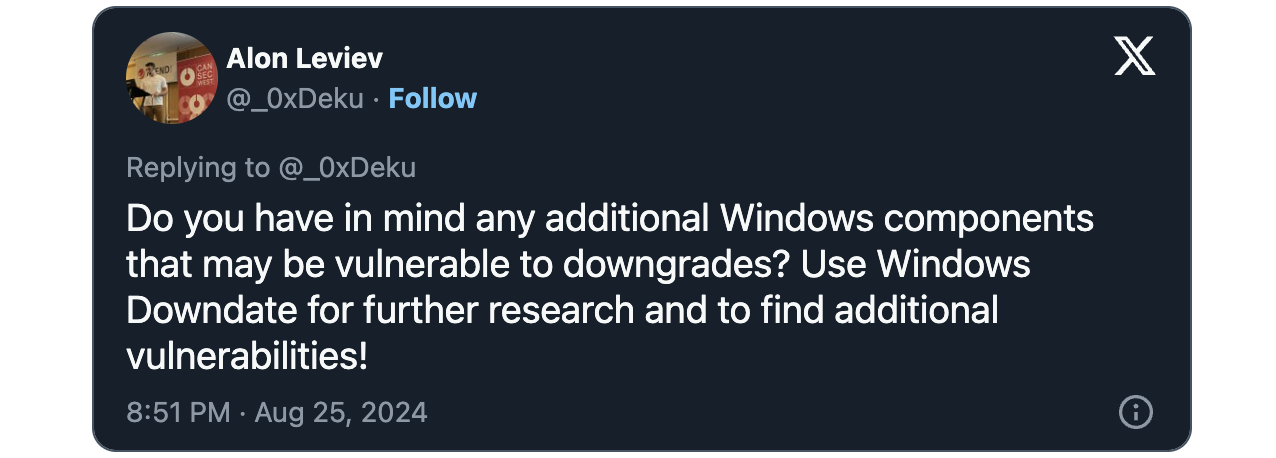
Leviev-Windows-Downdate-tweet

As Leviev said at Black Hat 2024 when he disclosed the Windows Downdate downgrade attack—which exploits the CVE-2024-21302 and CVE-2024-38202 vulnerabilities—using this tool is undetectable because it cannot be blocked by endpoint detection and response (EDR) solutions and Windows Update keeps reporting that the targeted system is up-to-date (despite being downgraded).

“I discovered multiple ways to disable Windows virtualization-based security (VBS), including its features such as Credential Guard and Hypervisor-Protected Code integrity (HVCI), even when enforced with UEFI locks. To my knowledge, this is the first time VBS’s UEFI locks have been bypassed without physical access,” Leviev said.

“As a result, I was able to make a fully patched Windows machine susceptible to thousands of past vulnerabilities, turning fixed vulnerabilities into zero-days and making the term “fully patched” meaningless on any Windows machine in the world.”

While Microsoft released a security update (KB5041773) to fix the CVE-2024-21302 Windows Secure Kernel Mode privilege escalation flaw on August 7, the company has yet to provide a patch for CVE-2024-38202, a Windows Update Stack elevation of privilege vulnerability.

Until a security update is released, Redmond advises customers to implement recommendations shared in the security advisory published earlier this month to help protect against Windows Downdate downgrade attacks.

Mitigation measures for this issue include configuring “Audit Object Access” settings to monitor file access attempts, restricting update and restore operations, using Access Control Lists to limit file access, and auditing privileges to identify attempts to exploit this vulnerability.

read more

Things a cybersecurity expert says they would never do

The rise of cyberattacks has become a growing concern in recent years as the threat of data breaches, ransomware and other malicious online activities has plagued organizations and digital users.

How can you protect your personal information and privacy? CTVNews.ca spoke to a cybersecurity expert on how to better safeguard against the evolving landscape of cyber threats.

Don’t: Reuse passwords

Use a unique password for each of your accounts, “especially for sites where you know a cyber criminal getting access to that information would potentially do some damage,” said Sam Andrey, managing director at The Dais, a Toronto Metropolitan University think tank focused on tech policy.

Sensitive materials include your email address, banking information, and personal files, he added.

Andrey said using a unique password for every account may feel unrealistic in a world where users have so many passwords, but password managers exist for that reason.

A password manager is a tech tool that helps users create, save and manage passwords across different online services, including web applications, online shops and social media. It makes it easier to keep track of passwords, as only one master password is needed, Andrey said.

Don’t: Skip two-factor authentication setup

Andrey said two-factor authentication is one of the “best measures” available to protect against breaches to your accounts.

With a two-factor authentication (2FA) setup, a user is granted access to an application after successfully presenting two forms of identification.

This adds an extra layer of security to your account in the event it is compromised or vulnerable to malicious activity.

Don’t: Skip software updates

“It’s very easy to click on ‘Oh I’ll do that tomorrow’ or ‘I’ll do that next time,'” Andrey said.

“It’s actually more important to do [software updates] these days than it is to buy some expensive antivirus software, [keeping updated] Windows Defender and other kinds of operating systems,” Andrey explained.

“Those patches and security updates fix the latest bugs and vulnerabilities that cybercriminals are taking advantage of and those things are always evolving,” he said.

Don’t: Use non-encrypted platforms

Andrey advised users to look for the lock symbol at the top of their browsers.

Encrypted platforms allow users to protect their information by entering it into a form that can only be read by the user who has permission to do so.

Gmail and most email programs are now encrypted by default, Andrey said.

Andrey said some messaging services, including Apple’s iMessage and WhatsApp, are encrypted end to end—not even the software or provider can view the messages.

For online shopping, Andrey said users should ensure they are using a secure website before entering banking or personal information.

Do: Use a VPN when travelling

For people who travel and use public Wi-Fi networks on subways or airports in other jurisdictions around the world, Andrey recommends buying a VPN to secure your connection when you’re away from home.

A VPN, or “virtual private network,” is a digital tool that encrypts your internet traffic and hides your identity online. There are plenty of options available to download with varying prices and features.

Do: Be wary of scams

Don’t provide login information by phone, [or] by text. Anytime anybody’s prompting you to do that, it’s almost for sure a scam,” Andrey said. “Don’t provide sensitive information.”

Andrey said it’s increasingly rare for companies to text links and users should verify the site they are entering information into to ensure legitimacy.

Check display names and emails to verify if they are correct or from the person you are expecting.

Do: Check default settings

“A lot of the times you’re prompted to opt into things that you don’t need. If you don’t need Google holding your search history for more than six months, have them auto delete it,” Andrey said.

Andrey said the same thing goes for personalized ads or location sharing. “Turn those things off because it just stores more data that is vulnerable to being misused,” Andrey explained.

For sites you visit for the first time—and have no intention of coming back—be careful about what information you provide them. Most want location, cookies and to track you across the internet, reject some of those things, Andrey said.

read more

Qilin ransomware now steals credentials from Chrome browsers

By

The Qilin ransomware group has been using a new tactic and deploys a custom stealer to steal account credentials stored in Google Chrome browser.

The credential-harvesting techniques has been observed by the Sophos X-Ops team during incident response engagements and marks an alarming change on the ransomware scene.

Attack overview

The attack that Sophos researchers analyzed started with Qilin gaining access to a network using compromised credentials for a VPN portal that lacked multi-factor authentication (MFA).

The breach was followed by 18 days of dormancy, suggesting the possibility of Qilin buying their way into the network from an initial access broker (IAB).

Possibly, Qilin spent time mapping the network, identifying critical assets, and conducting reconnaissance.

After the first 18 days, the attackers moved laterally to a domain controller and modified Group Policy Objects (GPOs) to execute a PowerShell script (‘IPScanner.ps1’) on all machines logged into the domain network.

The script, executed by a batch script (‘logon.bat’) that was also included in the GPO, was designed to collect credentials stored in Google Chrome.

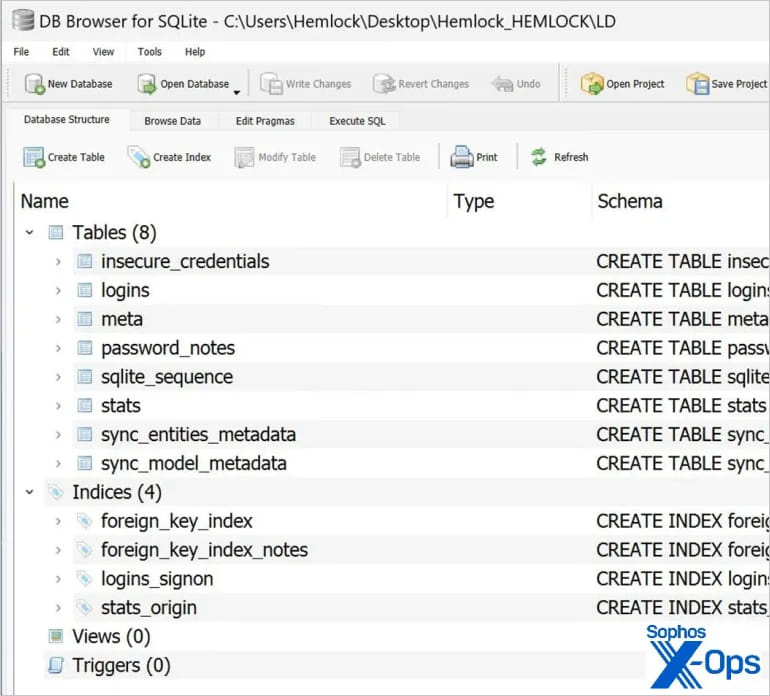
The batch script was configured to run (and trigger the PS script) every time a user logged into their machine, while stolen credentials were saved on the ‘SYSVOL’ share under the names ‘LD’ or ‘temp.log.’

Contents of the LD dump
Source: Sophos

After sending the files to Qilin’s command and control (C2) server, the local copies and related event logs were wiped, to conceal the malicious activity. Eventually, Qilin deployed their ransomware payload and encrypted data on the compromised machines.

Another GPO and a separate batch file (‘run.bat’) were used to download and execute the ransomware across all machines in the domain.

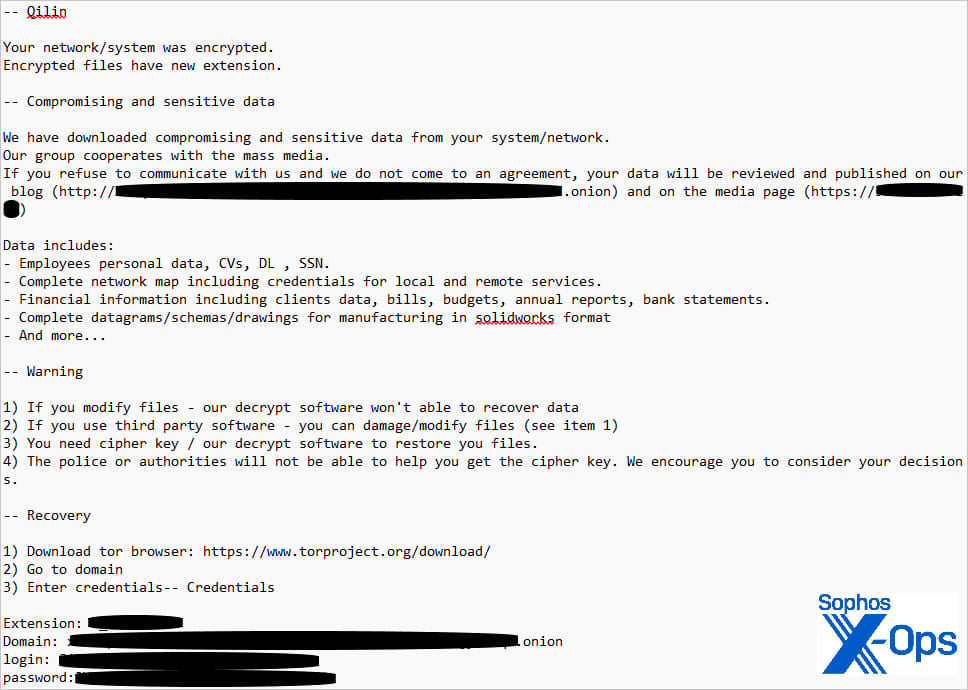
Qilin's ransom note
Qilin’s ransom note
Source: Sophos

Defense complexity

Qilin’s approach to target Chrome credentials creates a worrying precedent that could make protecting against ransomware attacks even more challenging.

Because the GPO applied to all machines in the domain, every device that a user logged into was subject to the credential harvesting process.

This means that the script potentially stole credentials from all machines across the company, as long as those machines were connected to the domain and had users logging into them during the period the script was active.

Such extensive credential theft could enable follow-up attacks, lead to widespread breaches across multiple platforms and services, make response efforts a lot more cumbersome, and introduce a lingering, long-lasting threat after the ransomware incident is resolved.

A successful compromise of this sort would mean that not only must defenders change all Active Directory passwords; they should also (in theory) request that end users change their passwords for dozens, potentially hundreds, of third-party sites for which the users have saved their username-password combinations in the Chrome browser. – Sophos

Organizations can mitigate this risk by imposing strict policies to forbid the storage of secrets on web browsers.

Additionally, implementing multi-factor authentication is key in protecting accounts against hijacks, even in the case of credential compromises.

Finally, implementing the principles of least privilege and segmenting the network can significantly hamper a threat actor’s ability to spread on the compromised network.

Given that Qilin is an unconstrained and multi-platform threat with links to the Scattered Spider social engineering experts, any tactical change poses a significant risk to organizations.

read more

Microsoft Sway abused in massive QR code phishing campaign

By

​A massive QR code phishing campaign abused Microsoft Sway, a cloud-based tool for creating online presentations, to host landing pages to trick Microsoft 365 users into handing over their credentials.

The attacks were spotted by Netskope Threat Labs in July 2024 after detecting a dramatic 2,000-fold increase in attacks exploiting Microsoft Sway to host phishing pages that steal Microsoft 365 credentials. This surge sharply contrasts the minimal activity reported during the year’s first half, showing the large scale of this campaign.

They primarily targeted users in Asia and North America, with the technology, manufacturing, and finance sectors being the most sought-after targets.

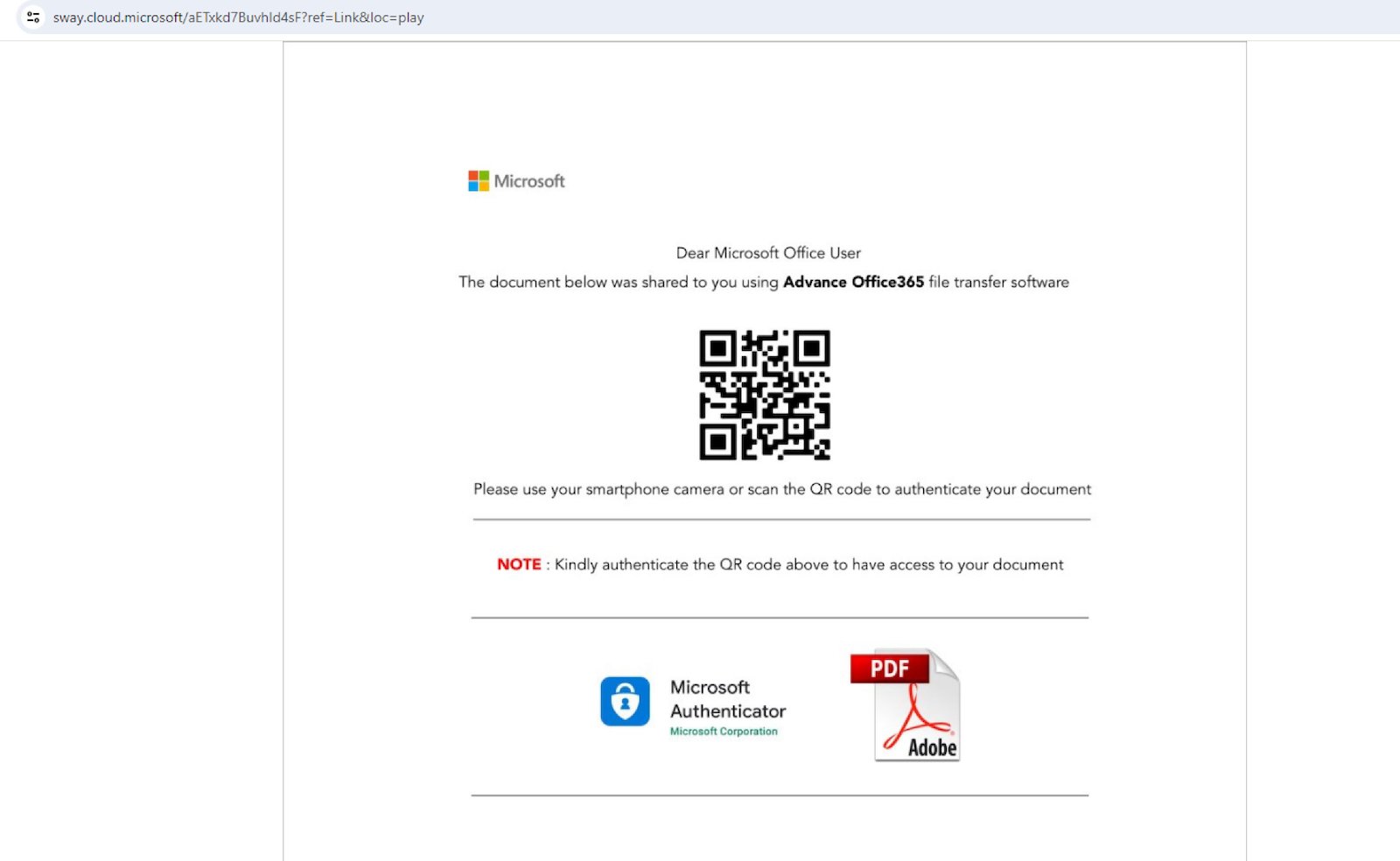
The emails redirected potential victims to phishing landing pages hosted on the sway.cloud.microsoft domain, pages that encouraged the targets to scan QR codes that would send them to other malicious websites.

Attackers often encourage victims to scan QR codes using their mobile devices, which typically come with weaker security measures, thus increasing the chances of bypassing security controls and allowing them to access phishing sites without restrictions.

“Since the URL is embedded inside an image, email scanners that can only scan text-based content can get bypassed. Additionally, when a user gets sent a QR code, they may use another device, such as their mobile phone, to scan the code,” the security researchers explained.

“Since the security measures implemented on mobile devices, particularly personal cell phones, are typically not as stringent as laptops and desktops, victims are then often more vulnerable to abuse.”

Sample Sway phishing page
Sample Microsoft Sway phishing page (Netskope)

The attackers employed several tactics to further boost their campaign’s effectiveness, like transparent phishing, where they stole the credentials and multi-factor authentication codes and used them to sign the victims into their Microsoft accounts while showing them the legitimate login page.

They also used Cloudflare Turnstile, a tool intended to protect websites from bots, to hide their landing pages’ phishing content from static scanners, helping to maintain the phishing domain’s good reputation and avoid getting blocked by web filtering services like Google Safe Browsing.

Microsoft Sway was also abused in the PerSwaysion phishing campaign, which targeted Office 365 login credentials five years ago using a phishing kit offered in a malware-as-a-service (MaaS) operation.

As Group-IB security researchers revealed at the time, those attacks tricked at least 156 high-ranking individuals at small and medium financial services companies, law firms, and real estate groups.

Group-IB said that over 20 of all harvested Office 365 accounts belong to executives, presidents, and managing directors at organizations in the U.S., Canada, Germany, the U.K., the Netherlands, Hong Kong, and Singapore.

read more

Infostealers Waltz Through macOS to Grab Crypto Wallets, Browser Creds

Ironically, Macs’ lower risk profile may make them more susceptible to any given threat than the average Windows or Linux system.

A new infostealer is trying to ride the coattails of one of the most prevalent malware tools on the planet, taking advantage of some inherent security shortcomings in macOS environments.

In a new blog post, Cado Security discusses “Cthulhu Stealer,” a new cybercrime tool making the rounds lately. It’s designed to nab cryptocurrency wallet and gaming credentials, as well as browser data. It isn’t particularly sophisticated, perhaps because it doesn’t have to be. Atomic Stealer — Cthulhu’s progenitor — has proven as much. In the past couple of years, this basically average stealer has become one of the most prevalent malwares across the globe. Perhaps, experts suggest, that has to do with some of the ways in which the security community has looked past Macs in the past.

Case Study: Cthulhu Stealer

Cthulhu Stealer is an Apple disk image (DMG) written in Golang. It typically arrives in front of a victim’s eyeballs masked as a legitimate software program, like the CleanMyMac maintenance tool or the Grand Theft Auto video game.

When opened, the program asks for the victim’s system password and, illogically, their Metamask cryptocurrency wallet password.

“It should look suspicious to users, but sometimes people download stuff and they might not be thinking,” notes Tara Gould, threat researcher at Cado Security. With Cthulhu’s target demographic in particular, “They could be younger, or maybe not as well-versed in computers. There’s a whole host of reasons why it may not potentially flag as suspicious.”

Once planted, the program gathers system data, such as its IP address, OS version, and various hardware and software information. Then it goes after its real aim: crypto, game account, and browser credentials. Targeted apps include the Coinbase, Binance, and Atomic crypto wallets, Firefox cookies, and Battle.net and Minecraft user data.

Despite running for $500 per month on cybercrime forums, Cthulhu Stealer is essentially unsophisticated, without any standout stealth techniques, and largely indistinguishable from at least one other commercially available offering in the underground.

The Road Atomic Stealer Paved

The most notable feature of Cthulhu Stealer is how closely it copies Atomic Stealer. Not only do they share many of the same functionalities and features, but Cthulhu Stealer even includes some of the same typos in Atomic Stealer’s code.

Atomic Stealer isn’t so remarkable itself. Previously, Dark Reading noted its lack of a persistence mechanism, and characterized it as “smash and grab” by nature. Still, it’s no wonder that other malware authors might want to copy it, since it’s one of the most successful infostealers in the world today.

In a report last month, Red Canary ranked it as the sixth most prevalent malware in the wild today, tied with the popular SocGholish and Lumma, and the ubiquitous Cobalt Strike. Its sixth place finish is actually a step down from previous Red Canary reports, which have included Atomic Stealer in its top 10 lists for the entirety of 2024 thus far.

“The fact that any macOS threat would make the top 10 is pretty staggering,” notes Brian Donohue, principal information security specialist with Red Canary. “I would venture to guess that any organization that has a meaningful footprint of macOS devices probably has Atomic Stealer lurking somewhere in their environment.”

How Enterprises Should Handle macOS Threats

Threats to macOS are distinctly less common than to Windows and Linux, with Elastic data from 2022 and 2023 suggesting that only around 6% of all malware can be found on these systems.

“Windows is still targeted the most, because large corporations all tend to still be very Windows-heavy, but that is shifting. A lot of enterprises are starting to increase the amount of Macs they have, so it is definitely going to become more of an issue,” Gould says.

Hackers aren’t all jumping on the bandwagon yet, but there is growing interest, perhaps because there’s so little interest on the part of defenders.

In an email to Dark Reading, Jake King, head of threat and security intelligence at Elastic, indicated that threats to Macs have risen less than 1% over the past year, adding, “While we’re not observing significant growth patterns that indicate enterprise-specific targeting of MacOS, it may be attributed to a lower volume of telemetry acquired from this OS. We have observed several novel approaches to exploiting vulnerabilities over the calendar year that indicate adversarial interest across a number of campaigns.” In other words: the data may indicate a lack of interest in macOS from attackers, or from defenders.

If runaway successes like Atomic Stealer do inspire more hackers to move operating systems, defenders will be working from a disadvantageous position, thanks to years of disinterest from the security community.

As Donohue explains, “A lot of enterprises adopt macOS systems for engineers and administrators, so a lot of the people who are using macOS machines are, by default, either highly privileged or dealing with sensitive information. And my suspicion is that there is less expertise in macOS threats across those organizations.”

There’s also less tooling, Donohue adds. “Take something like EDR, as an example. These started out as tools for protecting Windows systems and then were later co-opted into being tools for protecting macOS systems as well. And Windows machines have really robust application control policies, but there isn’t really similar functionality in macOS Gatekeeper (which is roughly analogous to Windows Defender). It’s pretty good at finding malicious binaries and creating YARA rules and signatures for them, but a lot of malware developers have been able to sidestep it.”

Elastic’s King adds, “Default operating system controls, while effective, are likely not evolving at a rate alongside adversarial behaviors.” For this reason, King says, “Ensuring sensible access permissions, sufficient hardening controls, and instrumentation that allows for organizations to observe or prevent threats on macOS systems remains important.”

read more
Trustpilot
The rating of livingsafeonline.com at Trustprofile Reviews is 9.1/10 based on 13 reviews.
Verified by MonsterInsights