

Fake Social Security Statement emails trick users into installing remote tool

by Pieter Arntz:

Fake emails pretending to come from the US Social Security Administration (SSA) try to get targets to install ScreenConnect, a remote access tool.

This campaign was flagged and investigated by the Malwarebytes Customer Support and Research teams.

ScreenConnect, formerly known as ConnectWise Control, is a remote support and remote access platform widely used by businesses to facilitate IT support and troubleshooting. It allows technicians to remotely connect to users’ computers to perform tasks such as software installation, system configuration, and to resolve issues.

Because ScreenConnect provides full remote control capabilities, an unauthorized user with access can operate your computer as if they were physically present. This includes running scripts, executing commands, transferring files, and even installing malware—all potentially without you realizing.

This makes ScreenConnect a dangerous tool in the hands of cybercriminals. A phishing group dubbed Molatori—because of the domains they use to host the ScreenConnect client—has been found to lure their targets into installing the ScreenConnect clients by sending emails pretending to come from the Social Security Administration (SSA):
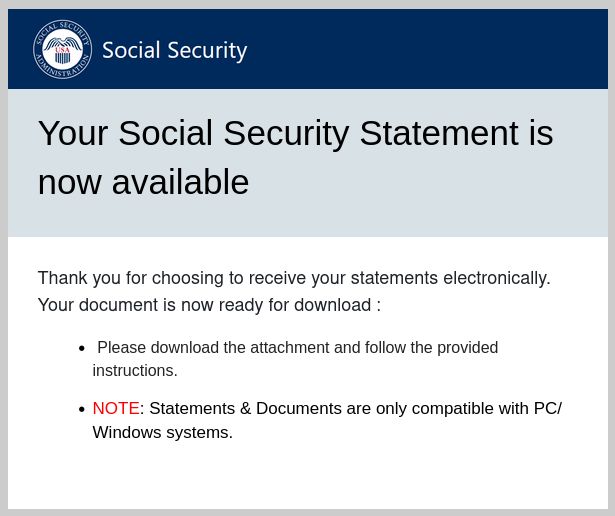
example SSA email

“Your Social Security Statement is now available
Thank you for choosing to receive your statements electronically.
Your document is now ready for download:

  • Please download the attachment and follow the provided instructions.
  • NOTE: Statements & Documents are only compatible with PC/Windows systems.”

There are some variations to this mail in circulation but the example above shows how legitimate these emails look.

The link in the email leads to the ScreenConnect support.Client.exe, but was found under several misleading names like ReceiptApirl2025Pdfc.exe, and SSAstatment11April.exe.

After cybercriminals install the client on the target’s computer, they remotely connect to it and immediately begin their malicious activities. They access and exfiltrate sensitive information such as banking details, personal identification numbers, and confidential files. This stolen data can then be used to commit identity theft, financial fraud, and other harmful acts. Experts have identified financial fraud as the primary objective of the Molatori group.

There are several circumstances that make this campaign hard to detect:

  • The cybercriminals send phishing emails from compromised WordPress sites, so the domains themselves appear legitimate and not malicious.
  • They often embed the email content as an image, which prevents email filters from effectively scanning and blocking the message.
  • ScreenConnect is a legitimate application which happens to be abused because of its capabilities.

What we can do

When receiving unsolicited emails there are a few necessary precautions you can take to avoid falling for phishing:

  • Verify the source of the email through independent sources.
  • Don’t click on links until you are sure they are non-malicous.
  • Don’t open downloaded files or attachments until you are sure they are safe.
  • Use an up-to-date and active anti-malware solution.
  • If you suspect an email isn’t legitimate, take a name or some text from the message and put it into a search engine to see if any known phishing attacks exist using the same methods.

Malwarebytes users are protected

Malwarebytes will detect suspicious instances of the ScreenConnect client as RiskWare.ConnectWise.CST.

Malwarebytes blocks RiskWare.ConnectWise.CST

And blocks connections to these associated domains:

  • atmolatori[.]icu
  • gomolatori[.]cyou
  • molatoriby[.]cyou
  • molatorier[.]cyou
  • molatorier[.]icu
  • molatoriist[.]cyou
  • molatorila[.]cyou
  • molatoriora[.]cyou
  • molatoriora[.]icu
  • molatoripro[.]cyou
  • molatoripro[.]icu
  • molatorisy[.]cyou
  • molatorisy[.]icu
  • onmolatori[.]icu
  • promolatori[.]icu
  • samolatori[.]cyou
  • samolatori[.]icu
  • umolatori[.]icu

We don’t just report on data privacy—we help you remove your personal information

Cybersecurity risks should never spread beyond a headline. With Malwarebytes Personal Data Remover, you can scan to find out which sites are exposing your personal information, and then delete that sensitive data from the internet.

read more

The growing threat of device code phishing and how to defend against It

Story by Mike Britton

Just as we think we’re getting one step ahead of cybercriminals, they find a new way to evade our defenses.

The latest method causing trouble for security teams is that of device code phishing, a technique that tricks users into granting access to sensitive accounts without attackers needing to steal a password.

Microsoft recently issued a warning about a particular device code phishing campaign being conducted by Storm-2372, where a supposed Russian-backed threat actor was wreaking havoc by hijacking user sessions through legitimate authentication flows. These attacks are trickier to detect than usual given that they exploit real login pages (rather than the spoofed versions that traditional phishing techniques relied on) and are capable of bypassing multi-factor authentication (MFA).

The recent warning from Microsoft will most likely be the first of many. Various other platforms follow the same style of authentication flows and attackers will most likely replicate the technique elsewhere. It is down to security teams once again to identify the warning signs of this new breed of phishing, and implement the best cybersecurity practices to get ahead of the curve.

Related video: Cyber security expert’s tips to keep phones safe (ITN)

Understanding device code phishing

Unlike traditional credential phishing attacks, device code phishing is unique in that there is no need to directly steal a password. Instead, attackers manipulate victims into handing over access to their accounts by exploiting authentication methods designed to make logging in easier.

They start the same way as most email attacks do: through social engineering. By impersonating a trusted colleague or IT administrator, the attackers send an email invitation to an online meeting (often a Microsoft Teams meeting) that looks legitimate. The email is designed to appear normal – for instance, it might look like a genuine Teams meeting invite.

When the victim clicks the link in the fake invite, they are prompted to log in using a special code (the “device code”), which is provided by the attacker. And because the website they land on is a real Microsoft login page, the user doesn’t suspect anything phishy.

What makes this technique especially dangerous is that it exploits legitimate authentication systems without creating counterfeit ones. This removes the need for attackers to steal passwords. Instead, they can gain access by capturing session tokens which allow them to operate without triggering additional authentication prompts. And because the tokens are already verified, attackers can often bypass MFA.

At first glance, nothing seems unusual. Suspicion is reduced due to the official Microsoft website, and therefore, victims won’t hesitate to enter a device code to authenticate the session. However, instead of linking their own device, they are unknowingly authorizing the attacker’s session. Once access is granted, the attacker has the keys to the kingdom and is free to operate within the victim’s account, access sensitive information, and launch lateral attacks.

How users can recognize and avoid these attacks

Device code phishing has created a minefield where legitimate tools are utilized for malicious purposes. Organizations must be proactive in recognizing these attacks and be sure to have effective authentication security measures in place.

Users should always treat unexpected meeting invites with suspicion, especially if they contain login prompts that require immediate action. Before entering any device code, users should verify the legitimacy of the request through a separate communication channel, such as a direct phone call or an internal messaging platform. If a login request appears out of the blue, it’s always best to avoid proceeding until its authenticity is confirmed.

Device codes are particularly impactful as they are designed to be entered on trusted devices. As a result, users should never share a login code with another person or enter a code they receive via email or chat unless they personally initiated the request. Legitimate services will never email a device code and then ask a user to input it on a separate website. If workforces can get to grips with this fundamental security principle, it can prevent many device code phishing attempts from succeeding.

Organizational steps to mitigate risk

Protecting against these attacks can’t rely solely on the user and organizations must take steps to reduce the risk of device code phishing.

One of the most effective measures is to disable any unnecessary device code authentication flows. If it isn’t essential for business operations, then it should be removed to eliminate a significant attack vector. Security teams should regularly review authentication policies and restrict device code logins to only trusted devices.

Conditional access policies go one step further, as they can restrict authentication attempts based on user behavior, device type, geographic location, and risk level. If a login attempt occurs from an unfamiliar location or outside of approved business hours, access can be blocked or require additional verification.

This is why it’s key to embrace behavioral AI measures which can establish baseline “normal” behaviors within an organization’s IT environment, and in turn question anything that seems out of the ordinary. Behavioral AI systems analyze characteristics like login patterns to detect anomalies, such as multiple authentication attempts from different locations or unusual device code submissions. By comparing these activities to known-good user behaviors, deviations from the norm can be flagged as suspicious.

And since device code phishing hinges on meeting invites to spread the attack, these should also be monitored. Security teams should regularly audit and flag unusual meeting request patterns, particularly those originating from compromised accounts.

Lastly, security awareness programs should be an ongoing feature of any cybersecurity strategy. Cyber threats evolve constantly, so training should also be continuous. Employees must be trained to recognize the warning signs of device code phishing and understand the risks of entering authentication codes without verification. Creating a culture where security is front of mind when handling unexpected requests is vital.

The time to act is now

As this latest technique continues to prove effective, cybercriminals will no doubt expand their use of device code phishing. Organizations must act now to defend against this emerging threat. A combination of user awareness and strong security policies which are strengthened by advanced threat detection can help organizations to stay ahead.

The sooner organizations implement these measures, the sooner they can reduce their exposure to device code phishing and protect their employees, data, and systems from this growing cyber threat.

We’ve listed the best identity management software.

This article was produced as part of TechRadarPro’s Expert Insights channel where we feature the best and brightest minds in the technology industry today. The views expressed here are those of the author and are not necessarily those of TechRadarPro or Future plc. If you are interested in contributing find out more here: https://www.techradar.com/news/submit-your-story-to-techradar-pro

read more
Trustpilot
The rating of livingsafeonline.com at Trustprofile Reviews is 9.1/10 based on 13 reviews.
Verified by MonsterInsights